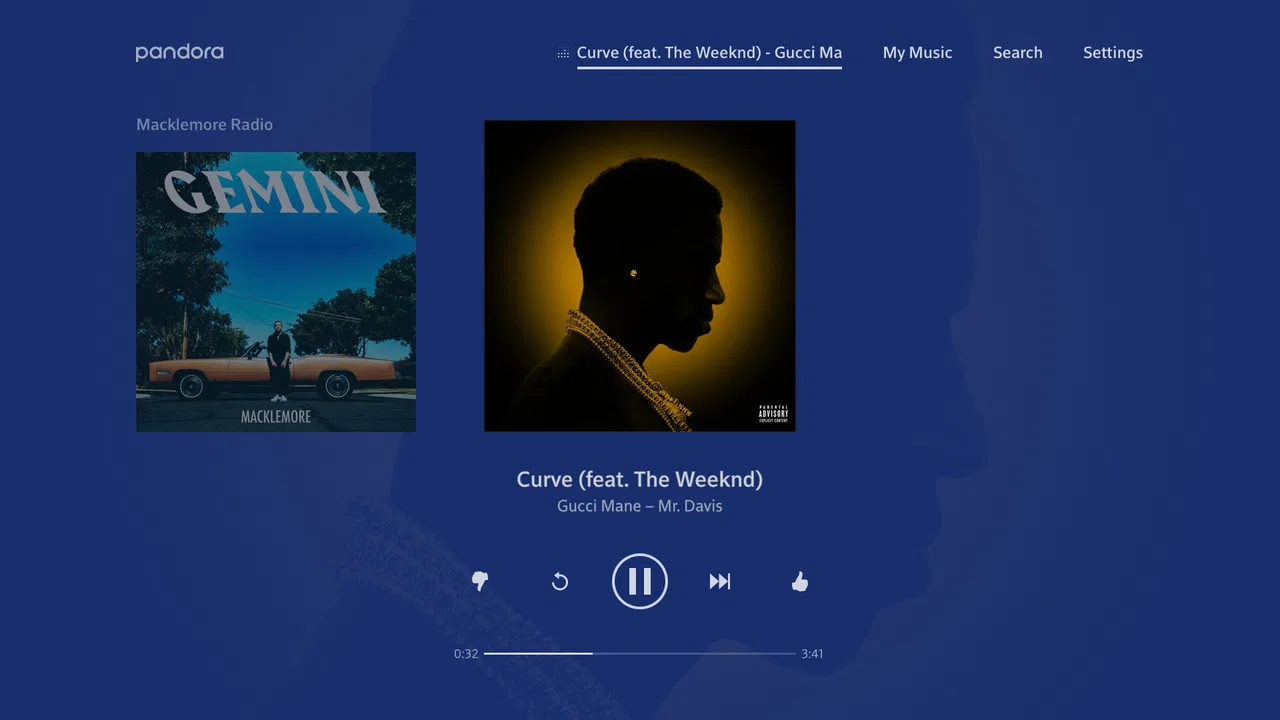
Pandora Music for TV
- 3.3
- Rating
- 10.00M
- Installs
- Free
- Price

 Analysis by App-foxy
I approached Pandora Music for TV as someone who wanted a simple way to put familiar music on a television without turning the experience into a complicated setup project. It is a free music and audio app from Pandora, aimed at streaming songs and artists on a TV, with a Teen content rating. My first impression was that its value depends less on collecting a personal library and more on how quickly it can turn a listening mood into a continuous session.
That distinction matters. If you already know exactly which album you want to play from beginning to end, a conventional music service may feel more direct. Pandora makes more sense when you want to start with an artist, song, or general musical direction and let the listening experience develop from there. I found that approach particularly comfortable in the background: cooking, tidying the living room, having friends over, or letting music fill the room without repeatedly choosing the next track.
What to expect before you start
The app sits in the Music & Audio category and is presented as Pandora Music, developed by Pandora. Its store summary focuses on playing new music and streaming favorite songs or artists on a television, so the big idea is straightforward: the TV becomes the listening point rather than merely a screen for browsing. That makes the app most appealing to people who treat music as part of an activity instead of a task requiring constant attention.
You May Also Like

 Blood Strike: 2.5 Anniversary
Blood Strike’s Loadouts Turn Every Drop Into a Tactical Gamble
A close look at Blood Strike’s custom loadouts: how fast access to signature weapons reshapes its battle royale rhythm, rewards preparation, and narrows the gap between fights.

 Pandora - Music & Podcasts
Pandora’s Music Is Easy to Start, but Harder to Recover
Pandora’s strength is its low-effort path from a seed to a station. Its weak spot is how much confidence it asks you to place in connection, setup, and quiet recovery.

 8 Ball Pool
 Is Built on Rivalries, Rematches, and Routine
A close look at the rivalries, rematches, shared routines, and unanswered safety questions that turn a quick pool match into a persistent mobile community.

 Samsung Music
’s Quiet Strength Is Playing What You Already Own
Its reach comes less from spectacle than from dependable access to a personal library. That simplicity is both the app’s strongest retention engine and its ceiling.

 AccuWeather: Weather Radar
AccuWeather Review: A Quick, Clear Forecast for Everyday Decisions
For everyday plans, the best forecast is the one you can understand quickly. AccuWeather makes rain timing, radar, and local conditions easy to act on, with a few trade-offs.

 Hill Climb Racing
Why Hill Climb Racing Still Turns Crashes Into One More Run
A tiny car, a bumpy hill and one more upgrade: Hill Climb Racing keeps resurfacing because its simple chaos makes every near-miss feel personal.
More From Our News Desk



I would not install it expecting a full replacement for every kind of music player. The television format changes the priorities. Large controls and a relaxed listening flow are more important than quickly managing a detailed collection. When I wanted background music, the service’s station-style approach felt natural. When I wanted precise control over every track, the experience was less compelling than a service built around on-demand selection and personal playlists.
The app has an average rating of 3.4 from around 747 ratings, while the wider install figure is over 5 million. I read those numbers as a useful warning against assuming that the app will suit everyone simply because it is widely used. The audience is clearly substantial, but the rating also suggests that compatibility, expectations, and the TV-based interface can affect satisfaction. I would treat it as an easy experiment rather than an automatic recommendation for every household.
It is free to install, with in-app purchases listed at $4.99 per item. That makes the initial decision low risk, but I still recommend paying attention to the options shown during use before committing to anything. The current version is 4.2.4, and it requires Android 5.0 or later. Those details are especially useful if you are installing on an older Android TV device or checking whether a spare television box can handle it.
Who gets the most from it
I think Pandora Music for TV works best for three kinds of listeners. The first is someone who wants familiar artists and related music without building a playlist from scratch. The second is a household that uses the television as its main speaker system and wants a visible, couch-friendly way to begin listening. The third is a person who enjoys discovery but does not want to spend an evening searching through albums, genres, and individual tracks.
It is less suitable for someone who needs a carefully arranged sequence for a workout, a party, or a long drive. It is also not my first choice for a listener who cares about detailed library organization, exact album playback, or the same advanced controls they might expect from a dedicated music service. Those are not small differences; they change whether the app feels effortless or restrictive.
Getting through the first setup without frustration
My advice is to begin with the television itself, not with a complicated listening plan. Install the app on the compatible Android TV device, open it, and keep the remote nearby. The first useful goal is simply to reach a playable music experience. Trying to understand every option before starting tends to make a straightforward app feel more involved than it needs to be.
Once the app opens, look for the path that lets you begin with a favorite artist or song. I prefer starting with an artist I know well, because it gives me an immediate reference point: within a short listening session, I can tell whether the resulting mix is close to my taste. Starting with an unfamiliar genre can be enjoyable, but it makes it harder to judge whether the app is working well or merely choosing music I do not enjoy.
The television interface deserves a different mindset from a phone interface. On a phone, tapping and scrolling are quick. With a remote, every movement takes a little more thought, and typing can be the slowest part. I found it helpful to decide on the first artist before opening the search field. That small bit of preparation avoids the familiar TV problem of wandering through menus while the room stays silent.
If the app asks you to sign in or continue through an account flow, take a moment to use the same account you expect to use with Pandora elsewhere. Keeping one account makes the service easier to recognize across devices and avoids the confusion of starting with one identity and later wondering why your listening choices do not appear as expected. I would not create multiple trial accounts just to get through setup; that usually creates more uncertainty than value.
There is also a practical household question: who will control playback? If the television is in a shared room, decide whether the remote remains the main controller or whether another device will be used when available. The answer affects how useful the app feels day to day. A service can be excellent for a person sitting close to the TV but less convenient if everyone keeps asking one person to change the music.
The first meaningful success
For me, the first successful action was not merely opening the app. It was starting an artist-based listening session and leaving it running long enough to decide whether the flow matched the room. That is the test I recommend to first-time users. Choose an artist you genuinely like, start playback, lower the remote, and listen while doing something else for a while.
This approach reveals the app’s real strength faster than menu browsing. You learn whether the music feels varied enough, whether the station direction suits your taste, and whether the TV is a comfortable listening source. If the first selection is too narrow or too predictable, try a different starting artist rather than judging the whole service from one attempt. The starting point has a large influence on the mood of the session.
A useful habit is to treat the first session as calibration. Notice which songs make you want more of that sound and which ones feel out of place. Use the available listening controls consistently instead of skipping randomly. Over time, deliberate feedback should give the service a clearer idea of what you enjoy. The key trade-off is that discovery becomes more convenient when you accept a little less moment-to-moment control.
For a realistic evening example, imagine preparing dinner after work. I would start Pandora Music for TV with an artist that fits the mood, begin playback, and leave the television at a comfortable volume while moving around the kitchen. If the first station feels too energetic, I would switch to a calmer starting point rather than repeatedly searching for individual songs. That workflow is faster and less distracting than managing a queue while handling food, dishes, and other tasks.
Small habits that make the experience better
One non-obvious advantage of the TV format is that it makes music easy to share. A guest can see what is playing and react to it without asking someone to hold up a phone. That works well for casual gatherings where people want a musical atmosphere, not a formal DJ queue. The trade-off is that shared control can also lead to interruptions, so the app works best when the group agrees on a general mood rather than demanding a precise sequence.
Another useful workflow is to create separate starting points for different parts of the day. I would use one familiar artist or style for focused work, another for cooking, and something more energetic for cleaning. This is not the same as maintaining a carefully ordered playlist; it is a way of reducing the number of decisions needed to begin. The benefit is speed, while the limitation is that the resulting session may still surprise you.
I also recommend judging the app on the television’s audio setup rather than on the app alone. A TV with weak built-in speakers can make any streaming service sound disappointing. If your television is connected to a soundbar or home audio system, Pandora becomes more convincing as a room-filling option. If the TV is placed far away or muted most of the time, the app may not solve the real problem, which is the listening environment.
For family use, the Teen content rating is worth keeping in mind. It does not tell me exactly how every listening session will feel for every household, but it is a reminder to consider who will be using the TV and whether the available music choices fit the room. I would be more comfortable introducing it in a shared space after checking the experience personally rather than assuming that a television interface automatically makes all content family-oriented.
Common points of confusion and honest limitations
The most likely misunderstanding is expecting the app to behave exactly like a conventional on-demand music library. Pandora’s appeal is the guided listening experience, so the app can feel less satisfying when you want to dictate every next song. If precise sequencing is your priority, choose a service designed around playlists and album control instead. If you want the service to help you discover a stream with minimal effort, Pandora’s approach is more sensible.
Another point of friction is remote navigation. Searching for a specific title with a television remote is rarely as quick as searching on a phone. I avoid unnecessary searches by deciding on a starting artist before I sit down and by using the app for longer listening sessions rather than constantly changing tracks. This is a simple adjustment, but it makes the difference between a relaxed experience and a sequence of small annoyances.
People also sometimes confuse “free” with “unlimited control.” The app itself is free, while in-app purchases are listed at $4.99 per item. I would read each option carefully and decide whether the free listening flow already meets your needs. If you are only looking for background music on the TV, paying for extras may not be necessary. If you dislike the limits of an ad-supported or less direct experience, compare the available choices with the cost and controls of alternatives before spending.
Performance expectations should be realistic on older hardware. The minimum operating system is Android 5.0, but meeting that requirement does not guarantee that every television setup will feel equally quick or comfortable. Older remotes, slow menus, and awkward screen placement can make navigation frustrating even when installation is possible. I would test the first listening session at the actual viewing distance, because an interface that looks fine up close may be tiring from the sofa.
There is also a difference between using the app alone and using it as part of a broader listening routine. Pandora Music for TV is convenient when the television is already on and the room is active. It is less attractive if you want private listening, offline access, or a compact mobile experience away from the living room. In those cases, a phone-first music app or a dedicated audio player may be the better tool.
Compared with radio-style alternatives, Pandora gives me a more personal starting point because I can begin from an artist or song I already enjoy. Compared with playlist-focused services, it asks me to surrender more control in exchange for less preparation. Compared with ordinary TV channel browsing, it is more directly centered on music rather than general entertainment. None of those comparisons makes it universally superior; they simply clarify the kind of decision it is designed to support.
Questions I would answer before recommending it
If you are wondering whether it is suitable for a first-time user, my answer is yes, provided your goal is to start listening quickly rather than configure a perfect library. Begin with one familiar artist, listen long enough to form an opinion, and only then explore additional choices. That path is less confusing than trying to understand every part of the service at once.
If you are asking whether it is worth installing on an older Android TV device, check the Android version first, since the app requires Android 5.0 or later. Then judge the remote and the TV’s responsiveness. Compatibility on paper is only the first step; a sluggish device can undermine the convenience that makes a TV music app appealing.
If you want to know whether it is good for parties, I would say it is best for informal gatherings where the group wants a steady atmosphere. It is not the ideal choice when guests expect everyone to request exact songs in a strict order. For that situation, a playlist-centered alternative may keep the room happier and reduce arguments over what plays next.
If you are concerned about paying, the installation price is free, and the listed in-app purchase amount is $4.99 per item. I would start without buying anything, learn whether the basic listening flow works for you, and then compare the value of any optional purchase against your actual habits. A person who only uses the app occasionally may have no reason to add costs.
Finally, if you are deciding between this and a phone-based service, ask where you usually listen. Choose Pandora Music for TV when the living room television and its speakers are central to your routine. Choose a mobile-first option when you need music while moving between rooms, commuting, or listening privately. The right choice is less about which catalog sounds more impressive and more about whether the control method fits your everyday life.
My recommendation after settling into the routine
After using it with that expectation, I see Pandora Music for TV as a comfortable, low-commitment way to bring artist-led music into a shared room. Its strongest moment is the transition from silence to a suitable stream: choose a starting point, begin playback, and let the service carry the session while you focus elsewhere. That is genuinely useful, especially for people who find playlist maintenance more tiring than enjoyable.
Its weaknesses are equally clear. Remote-based searching can be slower than phone navigation, exact song control is not its main appeal, and the experience depends heavily on the television and audio equipment. Users who want total control, private listening, or a meticulously arranged collection should look at other music services first. I would also avoid recommending it blindly to someone who dislikes discovery-based playback.
For a first-time user, my practical route is simple: confirm the device meets Android 5.0 or later, install the free app, sign in through the intended account flow, choose a familiar artist, and let the first session play long enough to judge the result. Use consistent feedback, try a second starting point if the first one misses, and decide whether the TV-based routine actually fits your home.
My final view is positive but specific. This is not a universal music solution, and it does not need to be. It is a useful choice when you want quick, shared, television-based listening with room for discovery. If that describes your evenings, Pandora’s simple starting point may become one of those apps you open without thinking. If your priority is precision, portability, or complete control over every track, I would spend your time with a different kind of music app.
FAQs for Pandora Music for TV
01What devices are compatible with Pandora Music for TV?
Pandora Music for TV is compatible with a wide range of smart TVs and streaming devices, including Amazon Fire TV, Roku, Apple TV, and certain models of Samsung and LG smart TVs. Before downloading, ensure your device supports the latest version of the Pandora app to enjoy seamless streaming.
02Is a Pandora Premium subscription required to use Pandora Music for TV?
No, a Pandora Premium subscription is not required to use Pandora Music for TV. However, a Premium subscription offers additional features such as ad-free listening, offline downloads, and on-demand music playback. Users can still enjoy the basic features of Pandora with a free account, albeit with ads.
03How can I control Pandora Music for TV?
Pandora Music for TV can be controlled using your TV remote or through the Pandora app on your smartphone or tablet. The mobile app offers a convenient way to browse and select music, adjust volume, and manage playlists without interrupting your viewing experience.
04Does Pandora Music for TV support personalized playlists?
Yes, Pandora Music for TV supports personalized playlists. With a Pandora account, you can create and manage your playlists on any device. The app also features personalized stations based on your listening preferences, providing a customized music experience right on your TV.
05Can I use voice commands with Pandora Music for TV?
Yes, if your TV or streaming device supports voice commands, you can use them to control Pandora Music for TV. Devices with integrated voice assistants like Alexa or Google Assistant allow you to play, pause, skip tracks, and search for music using simple voice commands, enhancing your listening experience.
Pros
- Seamless integration with smart TVs.
- High-quality audio streaming available.
- User-friendly interface for easy navigation.
- Extensive music library with diverse genres.
- Personalized playlists improve over time.
Cons
- Limited offline playback options.
- Ads can be intrusive without a subscription.
- Occasional buffering on slower connections.
- Some advanced features behind a paywall.
- No direct song selection in free version.

Pandora Music for TV
Gallery